Settings & services
-
How do I change my default/personal settings?
Under “Settings > My profile”, you can choose your personal settings such as language, standard debit account and standard portfolio. You can also set a monthly transfer limit for all client relationships, set messages and chose settings for signing transactions.
-
How do I change my password?
You can change your password at any time under “Settings > My profile”. You can also set device management here. Please follow the instructions on length of password.
-
Where do I see detailed information about my account?
Click on “Assets > Asset overview” and then on the three dots on the right and select “Account information”. Detailed account information such as conditions, information on withdrawals and exempt amounts are displayed.
-
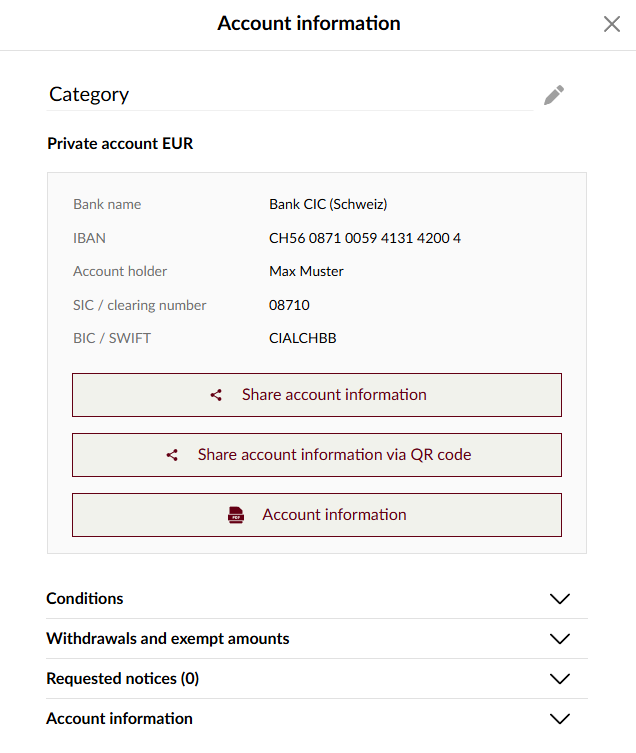
How do I change the heading name on an account?
Select the relevant account under “Assets > Asset overview” and click on the three dots on the right. You can then enter the desired heading under “Account information”.
-
How do I manage my notifications?
Under “Settings > Notifications” you can set the events for which you want to be automatically informed by push messages to your smartphone, by e-mail or sometimes by SMS. That way you know, for example, when a credit is paid to your account, your account is debited or a payment is not executed.
To active or deactivate notifications please select the controller in the “On/Off” column and select the channels you want to receive messages through.
-
How do I register a new or additional mobile device?
If you already have a mobile device that has been registered and still have access to it, you can easily register a new or additional mobile device yourself:
- Open the CIC eLounge app on your existing device
- Go to “Settings” > “Device management”
- Select “Register device”
- Then follow the instructions on both devices
Please note: You can only register a new device if two-factor authentication (login with facial ID, fingerprint or PIN) has been activated on your current mobile device. Logging in solely with a user ID and password is not sufficient. Registered devices can only be managed in the CIC eLounge app on your mobile device.
If you no longer have access to your existing mobile device, please contact the CIC eLounge Hotline by calling +41 (0)58 268 16 30 or sending an email to elounge@cic.ch.
Support is available to you via the Hotline from Monday to Friday, 8.00 am to 5.30 pm (except on official public holidays).